How I Self-Host GBrain for Multiple Coding Agents
I moved GBrain from a local PGLite database to a shared PostgreSQL service in my homelab so several coding agents can use the same persistent memory.
I use Claude, Codex, and Oh My Pi for different kinds of work. The tools are separate, but I want them to remember the same projects, decisions, and working context.
GBrain gives them that memory through MCP. My first setup used its local PGLite engine. That was the right place to start because it needed no server and worked well for one agent on one machine.
The problem appeared when I wanted several agents and editors to use the same brain. Running another local copy for each client would create separate sources of truth. Sharing one local database between processes would also make ownership and recovery harder.
I wanted a simple result:
- one writable brain
- several authenticated MCP clients
- local embeddings without an API bill
- a migration I could reverse
- backups that I had actually restored
The setup I ended up with
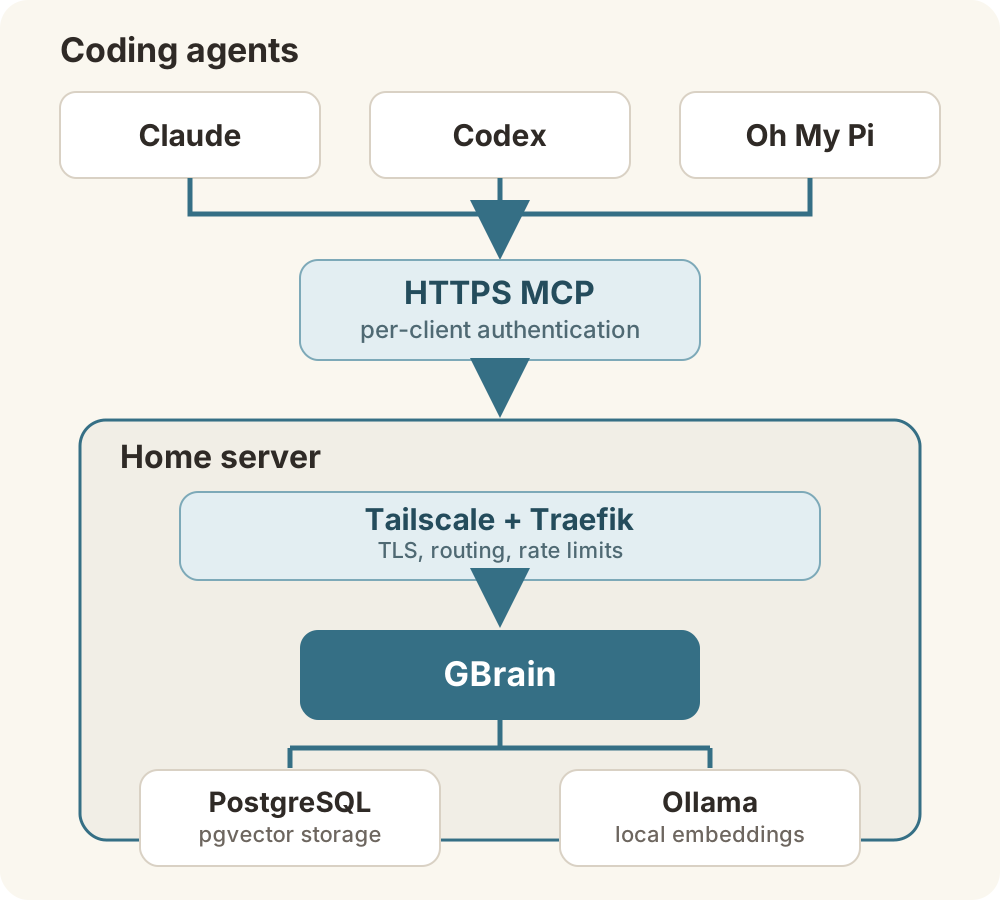
The agents connect to one HTTPS MCP endpoint. Traefik handles the route and TLS. GBrain handles MCP authentication and writes to PostgreSQL. Ollama creates embeddings on the same server.
The server has four CPU cores and 8 GB of memory. That has been enough for a small Markdown brain, PostgreSQL, GBrain, and CPU-only embeddings. The first embedding pass takes time, but normal stale-only updates are much smaller.
Why I moved from PGLite to PostgreSQL
PGLite was not a bad choice. It was the wrong topology once several clients needed the same state.
GBrain’s own architecture guide positions PGLite as the zero-configuration personal engine and PostgreSQL with pgvector as the shared or multi-machine engine. PostgreSQL gives the service one database that can handle concurrent requests, while pgvector stores the embeddings used for semantic search.
My Markdown repositories remain the source of truth. GBrain syncs them into PostgreSQL for search and retrieval. That separation matters because I can rebuild the database from the source files if I need to.
Why I use Ollama for embeddings
Hosted embeddings are convenient, but every initial import and later update sends text to an external API and adds usage cost. I already had a homelab server sitting mostly idle, so I chose Ollama with nomic-embed-text.
The model produces 768-dimension embeddings and runs locally. I do not pay an embedding API bill, and the source text stays on my server.
CPU embeddings needed one adjustment. GBrain initially tried too many concurrent requests for this machine and hit its request timeout. I reduced embedding concurrency to one and raised the timeout to five minutes. That made the initial backfill slower but reliable.
The compact Docker setup
I build GBrain from a pinned upstream commit instead of installing the newest code every time the container starts. The Dockerfile is small:
FROM oven/bun:1.3.10-slim

ARG GBRAIN_REF

RUN apt-get update \
    && apt-get install -y --no-install-recommends ca-certificates git \
    && rm -rf /var/lib/apt/lists/*

WORKDIR /app

RUN git init \
    && git remote add origin https://github.com/garrytan/gbrain.git \
    && git fetch --depth 1 origin "${GBRAIN_REF}" \
    && git checkout --detach FETCH_HEAD \
    && bun install --frozen-lockfile --production \
    && rm -rf .git

RUN mkdir -p /home/bun/.gbrain && chown -R bun:bun /home/bun

ENV HOME=/home/bun
USER bun
ENTRYPOINT ["bun", "run", "src/cli.ts"]
The Compose file has three services:
name: gbrain

services:
  postgres:
    image: pgvector/pgvector:pg16
    restart: unless-stopped
    environment:
      POSTGRES_DB: gbrain
      POSTGRES_USER: gbrain
      POSTGRES_PASSWORD: ${POSTGRES_PASSWORD:?set POSTGRES_PASSWORD}
    volumes:
      - postgres-data:/var/lib/postgresql/data
    healthcheck:
      test: ["CMD-SHELL", "pg_isready -U gbrain -d gbrain"]
      interval: 10s
      timeout: 5s
      retries: 10

  ollama:
    image: ollama/ollama:latest
    restart: unless-stopped
    volumes:
      - ollama-data:/root/.ollama

  gbrain:
    build:
      context: .
      args:
        GBRAIN_REF: ${GBRAIN_REF:?set GBRAIN_REF}
    restart: unless-stopped
    depends_on:
      postgres:
        condition: service_healthy
    environment:
      DATABASE_URL: postgresql://gbrain:${POSTGRES_PASSWORD}@postgres:5432/gbrain
      OLLAMA_BASE_URL: http://ollama:11434/v1
      GBRAIN_EMBEDDING_MODEL: ollama:nomic-embed-text
      GBRAIN_EMBEDDING_DIMENSIONS: "768"
      GBRAIN_EMBED_CONCURRENCY: "1"
      GBRAIN_AI_EMBED_TIMEOUT_MS: "300000"
      GBRAIN_ADMIN_BOOTSTRAP_TOKEN: ${GBRAIN_ADMIN_BOOTSTRAP_TOKEN:?set GBRAIN_ADMIN_BOOTSTRAP_TOKEN}
    volumes:
      - ./data/gbrain-home:/home/bun/.gbrain
      - ./data/sources:/data/sources
    ports:
      - 127.0.0.1:3131:3131
    command:
      - serve
      - --http
      - --bind
      - 0.0.0.0
      - --port
      - "3131"
      - --public-url
      - https://brain.example.com
      - --suppress-bootstrap-token

volumes:
  postgres-data:
  ollama-data:
Before importing anything, pull and test the embedding model:
docker compose up -d postgres ollama
docker compose exec ollama ollama pull nomic-embed-text
docker compose run --rm gbrain providers test \
  --model ollama:nomic-embed-text
docker compose up -d gbrain
Generate POSTGRES_PASSWORD and GBRAIN_ADMIN_BOOTSTRAP_TOKEN with a password generator or openssl rand -hex 32. Keep the real values in a mode-600 environment file and keep that file out of Git. Pin GBRAIN_REF to a tested release tag or commit.
Exposing only the MCP route
GBrain binds to 127.0.0.1:3131 on the host. Traefik is the only external entry point, and I publish only the exact /mcp path:
http:
  routers:
    gbrain-mcp:
      rule: "Host(`brain.example.com`) && Path(`/mcp`)"
      entryPoints: [websecure]
      service: gbrain-mcp
      middlewares: [gbrain-rate-limit]
      tls:
        certResolver: tailscale

  services:
    gbrain-mcp:
      loadBalancer:
        servers:
          - url: "http://127.0.0.1:3131"

  middlewares:
    gbrain-rate-limit:
      rateLimit:
        average: 100
        burst: 200
I used an exact path because the same Traefik instance serves other applications. PathPrefix("/mcp") could capture routes that belong to another service.
My deployment uses a separate legacy bearer token for every client. This lets me revoke one agent without disconnecting the others. Current GBrain remote deployment documentation recommends OAuth 2.1 for new HTTP deployments, so use that path when your clients support it.
Migrating without losing the old brain
I treated the existing PGLite brain as the recovery point, not as something to replace in place.
- I stopped the local GBrain process so the database was no longer changing.
- I copied the full PGLite directory and generated checksums for the snapshot.
- I started a fresh PostgreSQL-backed GBrain service.
- I imported the same Markdown sources into the new database.
- I generated the missing embeddings and checked that none were stale.
- I compared page and chunk counts, then tested keyword and semantic retrieval.
- I switched the clients only after those checks passed.
The old PGLite brain still exists as a read-only recovery copy. I do not run both brains as writable services because that would recreate the split-brain problem I was trying to remove.
Connecting several agents
Clients with remote HTTP MCP support connect directly:
{
  "mcpServers": {
    "gbrain": {
      "type": "http",
      "url": "https://brain.example.com/mcp",
      "headers": {
        "Authorization": "Bearer <per-client-token>"
      }
    }
  }
}
Codex supports remote HTTP MCP, but GBrain’s tools did not mount in my Codex session running through Orca. I used mcp-remote as a local stdio bridge for that setup:
{
  "mcpServers": {
    "gbrain": {
      "command": "mcp-remote",
      "args": [
        "https://brain.example.com/mcp",
        "--header",
        "Authorization:${AUTH_HEADER}",
        "--transport",
        "http-only",
        "--silent"
      ],
      "env": {
        "AUTH_HEADER": "Bearer <per-client-token>"
      }
    }
  }
}
The bridge changes the client transport. It does not create another brain. Every request still reaches the same server and database.
After configuring each client, I restarted it and called GBrain’s identity and health tools. That caught a configuration that looked correct on disk but had not loaded into the running editor.
Backups and maintenance
Centralising the brain makes maintenance my responsibility.
I run source syncs regularly and embed only stale chunks. I also create daily PostgreSQL dumps in custom format, write SHA-256 checksums beside them, and retain a small rotation on the server.
A backup is only useful if it restores. Once a week, a script creates a temporary database, restores the latest dump, compares its page count with the live database, and removes the temporary database. I also keep an off-host copy because server-local backups do not help if the whole server fails.
Conclusion
The important change was choosing one writable brain and treating every agent as a client. PostgreSQL gives the agents shared state, Ollama keeps embedding work local, and authenticated MCP makes the service available outside the host without exposing PostgreSQL or Ollama.
PGLite is still the simpler choice for one agent on one machine. Once several agents need the same memory, a central PostgreSQL-backed GBrain is easier to reason about, back up, and verify.